

Skip to content
StratTrade
Visual Strategy Builder + TradingView Automation

Build your strategy. Connect TradingView. Execute with control.

Create BUY and SELL logic with a visual indicator strategy builder, or turn TradingView alerts into automated spot orders. Backtest your ideas, configure execution and risk, then monitor every strategy from one Windows desktop platform.

36 built-in indicators Visual ALL / ANY logic TradingView webhook & email Single Order & DCA Spot
StratTrade Engine
36 Built-in indicators Trend, momentum, volatility, volume, and exit tools
2 Automation paths Indicator strategies or TradingView signals

Two strategy paths

Choose how your automation receives a trading decision

Build the decision inside StratTrade with indicators and visual logic, or let TradingView send qualified BUY and SELL alerts. Both paths use the same execution, risk, monitoring, and exchange controls.

Path 01

Indicator Strategy

Build BUY and SELL rules visually using built-in technical indicators and ALL / ANY group logic.

  • Combine multiple conditions instead of relying on a single signal.
  • Configure symbol, exchange environment, order value, and execution behavior.
  • Save, import, inspect, duplicate, and manage strategy files from the library.
  • Backtest the strategy before allowing live or testnet execution.

Path 02

TradingView Strategy

Connect TradingView alerts to StratTrade through webhook or email signal sources and automate the resulting actions.

  • Map TradingView alert keys to BUY and SELL actions.
  • Build alert groups with top-level ALL / ANY matching logic.
  • Route alerts through the same market filters, risk guards, and order safety checks.
  • Control accepted signal sources and protect execution from invalid or stale inputs.

Professional indicator library

36

Built-in indicators for complete rule-based strategies

Use widely recognized trend, momentum, volatility, volume, and exit indicators. Mix them into BUY and SELL groups and define whether every condition or any condition must pass.

ALL Every condition must match ANY One qualified condition can match

Trend

MAMA CrossMA SlopeHMAKAMAAroonADXSuperTrend

Momentum

RSIMACDStochasticStochastic RSITSIConnors RSIROCCCI

Volatility & bands

Bollinger BandsKeltner ChannelsATRDonchian BreakoutHistorical VolatilityCHOP

Volume & price / exit

MFIOBVCMFVWAPVWMAChandelier ExitParabolic SARIchimoku

Execution & risk controls

A strategy does more than send BUY and SELL

Control how orders are placed, when a position can be re-entered, how DCA safety buys behave, and which exchange protections must pass before execution.

Execution modes

Single Order or DCA Spot

Use a standard single-entry workflow, or configure DCA Spot safety buys that are added only after a defined price drop and minimum time delay.

Safety buy value Maximum safety buys Price-drop trigger Delay between orders
%

Risk & exit management

Enable stop loss and take profit from average entry, define a cooldown after a full exit, and require a minimum re-entry move.

Order safety controls

Apply exchange market filters, confirm fills, prevent conflicting in-flight orders, and use controlled timeout settings.

Exchange-aware execution

Configure Binance or KuCoin environments while the runtime monitors order state, balances, active positions, and service health.

Complete trading workflow

From strategy idea to monitored execution

StratTrade brings strategy creation, historical validation, automated execution, and operational monitoring into one connected desktop workflow.

01

Build precise rules

Create separate BUY and SELL logic using indicators, conditions, and nested ALL / ANY groups.

02

Backtest before execution

Run focused or batch backtests, inspect results, and validate strategy behavior against historical candles.

03

Run multiple strategies

Manage supported concurrent strategies from a unified runtime according to the capacity of your selected plan.

04

Monitor the full operation

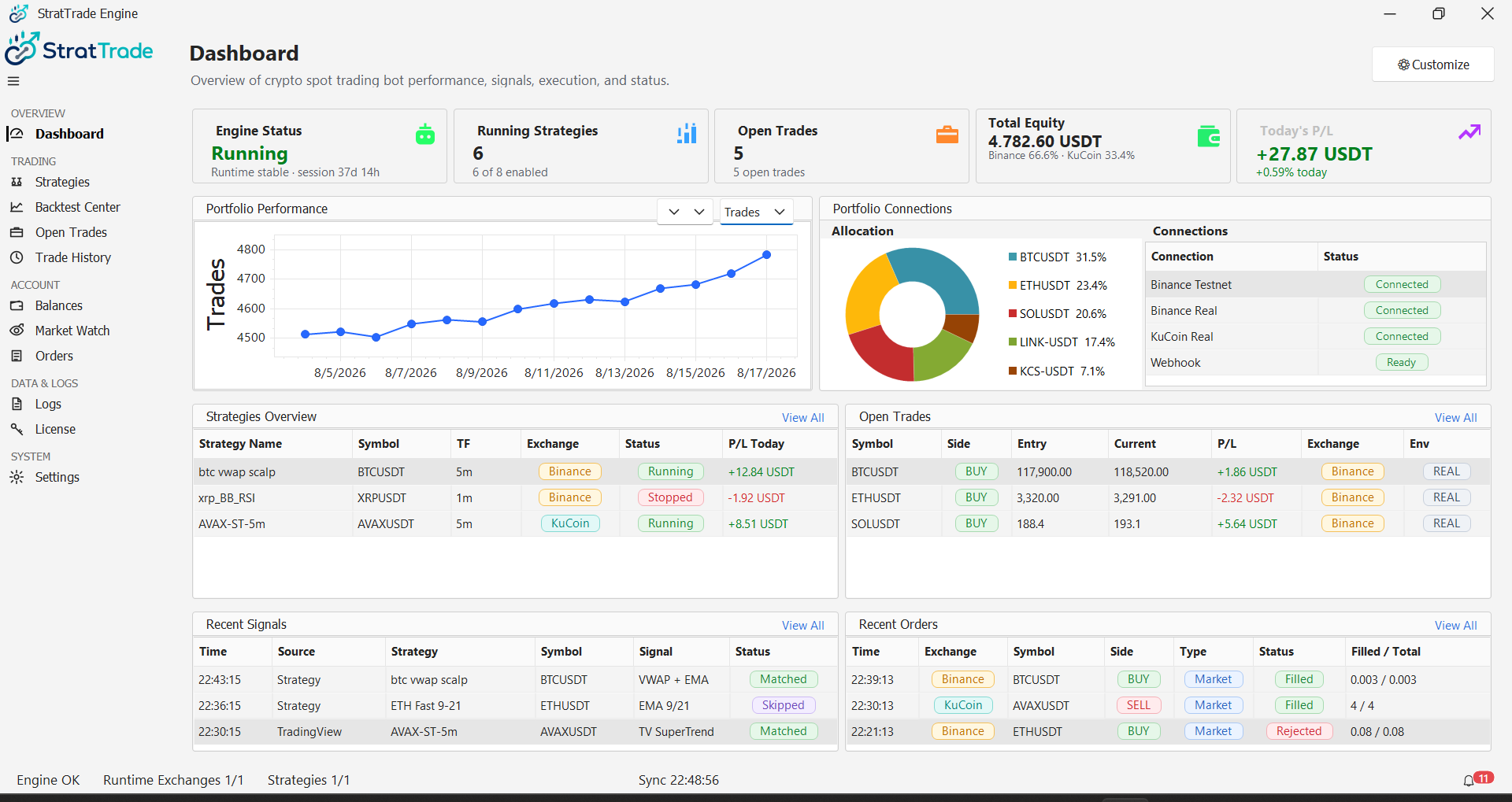
Track balances, open trades, orders, history, recent signals, service health, notifications, and logs.

Real product screens

A desktop platform built for operational clarity

Every screen below comes from the uploaded StratTrade source build.

Strategy library

Create, import, inspect, filter, and control your strategy files.

Backtest Center

Validate strategy logic against historical market candles.

Open trades

Review live exposure and strategy-linked positions.

License & subscription

See your active plan, device, status, and subscription context.

Platform settings

Configure exchanges, execution, risk, TradingView, notifications, and updates.

Simple commercial delivery

Choose a plan. Pay securely. Activate and start building.

StratTrade is a paid desktop product. Complete checkout by bank card or a supported crypto gateway, receive your license, then download the application from your customer account.

  1. 1
    Choose your plan

    Select Limited, Pro, or Ultimate and choose monthly, yearly, or lifetime billing.

  2. 2
    Complete checkout

    Use an enabled bank-card gateway or a supported cryptocurrency option such as USDT.

  3. 3
    Receive your license

    A confirmed WooCommerce order is passed to the existing license issuance system.

  4. 4
    Download and activate

    Open your account, download StratTrade, activate your device, and create your first strategy.

Plans & pricing

Choose the automation capacity that fits your workflow

Select a billing term and compare three clear plans. Product prices and entitlements remain managed by WooCommerce and the existing licensing system.

Plan features and prices are loaded from the published WooCommerce products. Checkout payment methods are controlled by the active payment gateways.

Bank-card checkout

Simple for everyday customers

WooCommerce can present Visa, Mastercard, Mada, Apple Pay, and other local methods supported by the selected payment gateway.

Crypto checkout

USDT and supported digital assets

Cryptocurrency options appear through the configured gateway. A license is issued only after the payment provider confirms the order.

Ready to automate?

Build your first StratTrade strategy.

View plansCustomer login →